


Wham Bam Systems
Wham Bam Magnetic Base - 320 x 310
Wham Bam Magnetic Base - 320 x 310
Couldn't load pickup availability
- Ships in 1–3 business days
- 7-day returns on unopened items
- Real people answer: bsys@consum3d.com
You may also want these


Wham Bam Magnetic Base 320 x 310 – High-Temperature 3D Printer Build Plate Magnet
Upgrade your 3D printing setup with the Wham Bam Magnetic Base, designed for reliable performance and secure build plate alignment. Compatible with Creality CR-10S Pro and Anycubic Kobra Plus, this high-quality magnetic base forms the foundation of a flexible build plate system.
Engineered to withstand high temperatures and long print durations, it ensures your flex plate stays firmly in place throughout every print.
High-Temperature Magnetic Performance
This magnetic base is specifically formulated for 3D printing environments where heat and consistency matter.
Key Benefits
Strong Magnetic Hold
Powerful magnets keep your build plate securely aligned, preventing movement during printing.
High-Temperature Resistance
Designed to perform under sustained high bed temperatures without losing magnetic strength.
Stable Printing Platform
Ensures consistent first layers by keeping your flex plate perfectly positioned.
Long-Lasting Durability
Built for repeated heating cycles and long-term use in demanding environments.
Easy Installation with 3M Adhesive
The Wham Bam Magnetic Base comes pre-backed with high-temperature 3M adhesive, making installation simple and reliable.
Installation Advantages
- Quick peel-and-stick application
- Strong, permanent bond to your heated bed
- No additional adhesives required
- Clean and professional setup
Built for Flexible Build Plate Systems
This magnetic base is an essential component of any flex plate system, allowing you to:
- Attach and remove flex plates easily
- Improve print removal efficiency
- Reduce damage to prints and tools
- Streamline your 3D printing workflow
Technical Specifications
- Compatibility: Creality CR-10S Pro, Anycubic Kobra Plus
- Size: 320 x 310 mm
- Thickness: 1 mm
- Adhesive: High-temperature 3M backing
- Function: Magnetic base for flex plates
Ideal Applications
This magnetic base is ideal for:
- Upgrading to a flex plate system
- Improving build plate alignment
- Enhancing print reliability
- High-temperature and long-duration prints
- Hobbyist and professional 3D printing setups
Reliable Foundation for Better Prints
The Wham Bam Magnetic Base provides the stability and performance needed for consistent, high-quality 3D printing.
Complete Your Build Plate System
Pair this magnetic base with a compatible flex plate to unlock easier print removal, improved workflow, and professional-level results.
Printer Fits
Printer Fits:
• Anycubic Kobra Plus
• Comgrow T300
• Creality CR-10S Pro
• Creality CR-10S Pro V2
• Creality CR-10S Pro V3
• Creality CR-X
• Creality Ender 3 Max
• Ender 3 Max Neo
• Formbot Troodon 300
• goofoo Nova
• Sovol SV06 Plus*
• Sovol SV07 Plus*
May fit:
• Anycubic Mega X
• Artillery X4 Plus S1**
• Creality CR10 Smart
• Kywoo Tycoon Max
• Sovol SV04
*for the SV06 Plus and SV07 Plus, you will either have to remove the two alignment screws at the rear of the build plate or mount the Flexi Plate 5 mm over the front of the bed.
**No alignment holes.
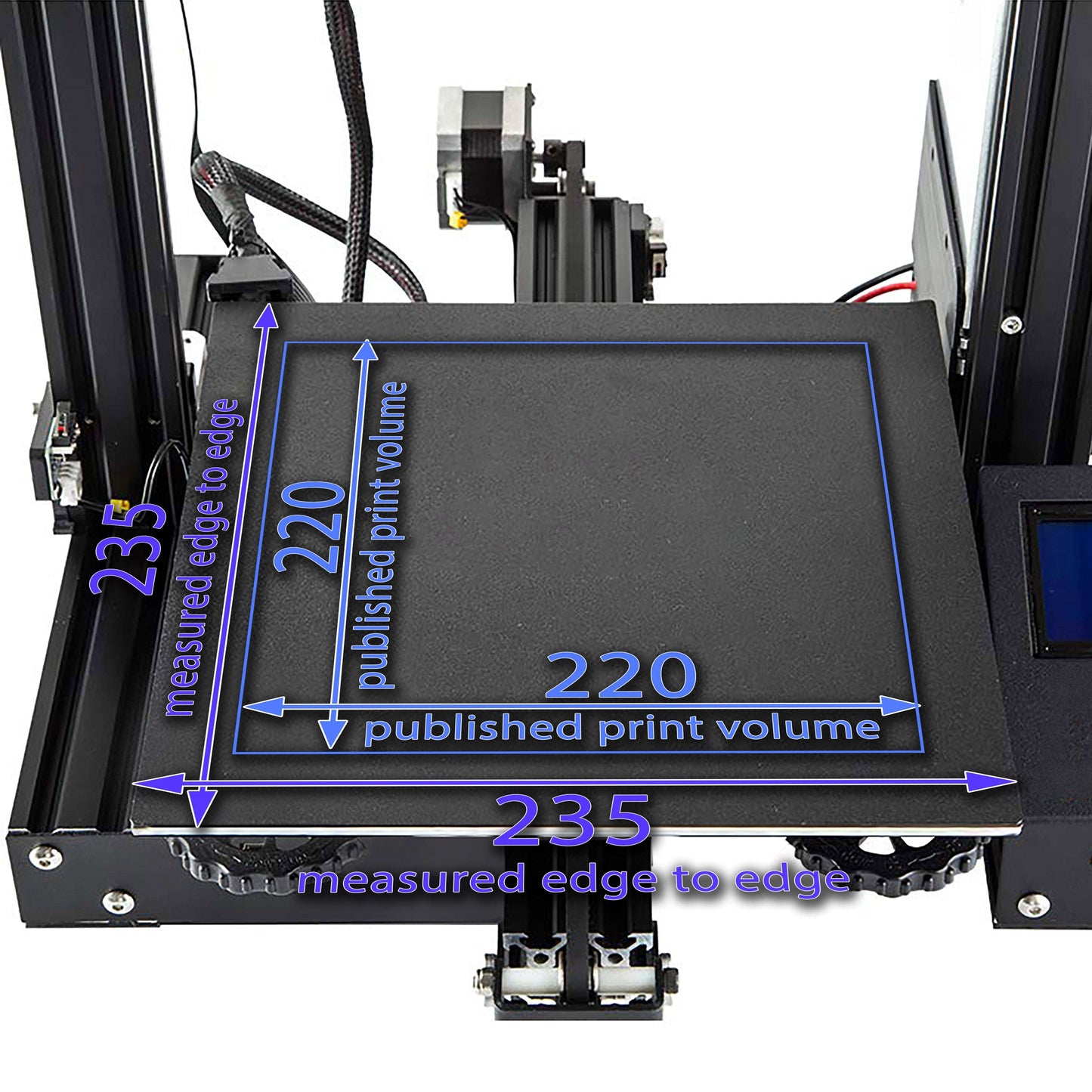
Not sure it fits?Measure your build plate as shown below and contact us with your printer model and measurements before ordering.

Contents & Tech Info
- 1 Magnetic Base
- 320 x 310 mm
- Magnetic Base 1mm
Magnetic Base with 3M Glue rated to 150°C continual use
Magnetic Base Install
Please follow these steps when applying a new Magnetic Base:
- Remove old magnet (if any), and clean the bed well to remove any glue. Use isopropyl alcohol and a fresh paper towel.
- Use 220 grit sandpaper to rough up the metal surface uniformly and remove any excess contaminants. If your surface is painted, try to break through the paint layer with the sandpaper at least partially.
- Clean with 90% isopropyl alcohol and a fresh paper towel. Repeat with alcohol and a fresh paper towel a few times until the paper towel comes away clean. Do not use shop rags, wipes, etc., as these will propagate contaminants back to the surface. Use only fresh paper towels.
- Let the bed completely dry before applying the magnet.
- Let 3M cure for a full 72 hours before use.
Magnetic Base install video clip:
Level after install
If your machine has automatic bed leveling, run the leveling process and set your gap such that the first layer is well squished. For more details on achieving the right first layer squish, refer to this bed leveling guide.
If your printer uses manual leveling, follow the same guide for instructions on the leveling process.
Full support info can be found on our support page.


What customers say about CONSUM3D
Recent reviews from customers across our store, not only for this product.
4.4 out of 5 · 7 reviews
-
Oct 25, 2026
Great product, it works well with the optml360 app. Scanning complex objects used to be a struggle, but the capture disc makes it effortless to capture complete models without missing angles.
W F.✓ Verified buyer
 Review of: CaptureDisc™ Basic – Photographic 3D Scanning Disc (6" & 8.5")
-
Oct 18, 2026
Broke after an hour with double lattice
Clark P.✓ Verified buyer
 Review of: Biqu PLA-HR Filament for Airless Basketballs etc. Multiple Colors
-
Oct 2, 2026
Easy, fun, and fast. Direct customer service not like Amazon!
Will H.✓ Verified buyer
Review of the CONSUM3D store
-
Oct 2, 2026
This is amazing!
Will H.✓ Verified buyer
Review of: CaptureDisc™ Basic – Photographic 3D Scanning Disc (6" & 8.5")
-
Sep 30, 2026
I had my doubts but works phenomenal on my sunlu s8 and has no issues heating to temp
FRANCISCO E.✓ Verified buyer
 Review of: Wham Bam Magnetic Base - 310 x 310
-
Sep 24, 2026
It arrived promptly, and works just as described. It’s just what I needed to store my filament.
Dan✓ Verified buyer
 Review of: Biqu Panda Filament Storage Feed Rack 5-tier holds 40+ 1kg spools
-
Sep 16, 2026
Good material. I used it to print a few card holders. 5/5
Matthew✓ Verified buyer